How it works Two products For schools Research Add to Chrome →
✦ Free Chrome extension  ·  New:  Word add-in for schools

Make any text
easier to
understand

ReadEase quietly emphasises the words that carry the meaning — so students with dyslexia, ADHD and reading difficulties catch the key ideas at a glance. Free in Chrome, and now inside Microsoft Word.

Or try the web formatter — paste any text, no install needed.
Live demo — try it

The mitochondria are membrane-bound organelles found in the cytoplasm of eukaryotic cells that generate most of the cell's supply of chemical energy.

In 1066 William of Normandy defeated King Harold at the Battle of Hastings — a conquest that reshaped English law, language and landholding forever.

A metaphor compares two unlike things directly, giving writers the power to surprise, persuade and move their readers.

Emphasis strength
A balanced amount — recommended for most readers.
0
Readers on Chrome
0
Emphasis tiers
0
Subject databases
0
Free school trial
Free
Chrome extension
AI
Claude-powered

Three steps to clearer reading

Set up once, then ReadEase works wherever the reading happens — in the browser or in Word.

01
Open anything
A webpage, a PDF, or the worksheet you're writing in Word. ReadEase meets students where they already read.
02
Choose subject and strength
Six subject databases, tuned by Key Stage. Pick Subtle, Medium or Bold — whatever suits the reader.
03
The key words stand out
AI scores every word for importance and emphasises the ones that matter across five tiers — so the brain processes them faster.

One idea, two places you read

The free Chrome extension helps students read anywhere on the web. The Word add-in brings the same careful emphasis to the worksheets teachers make every day.

Live on the Chrome Web Store

ReadEase for Chrome

Read anywhere — articles, revision sites, online textbooks.
bbc.co.uk/bitesize
Rivers shape the land through erosion, transportation and deposition, carving valleys over thousands of years.
  • Completely free — no account, no sign-up
  • Works on any webpage, plus PDF upload
  • Six subject databases, five emphasis tiers
  • One in five students struggle with reading — this quietly helps, without singling anyone out
New · Coming to Microsoft AppSource

ReadEase for Word

Made for teachers — format a worksheet in one click.
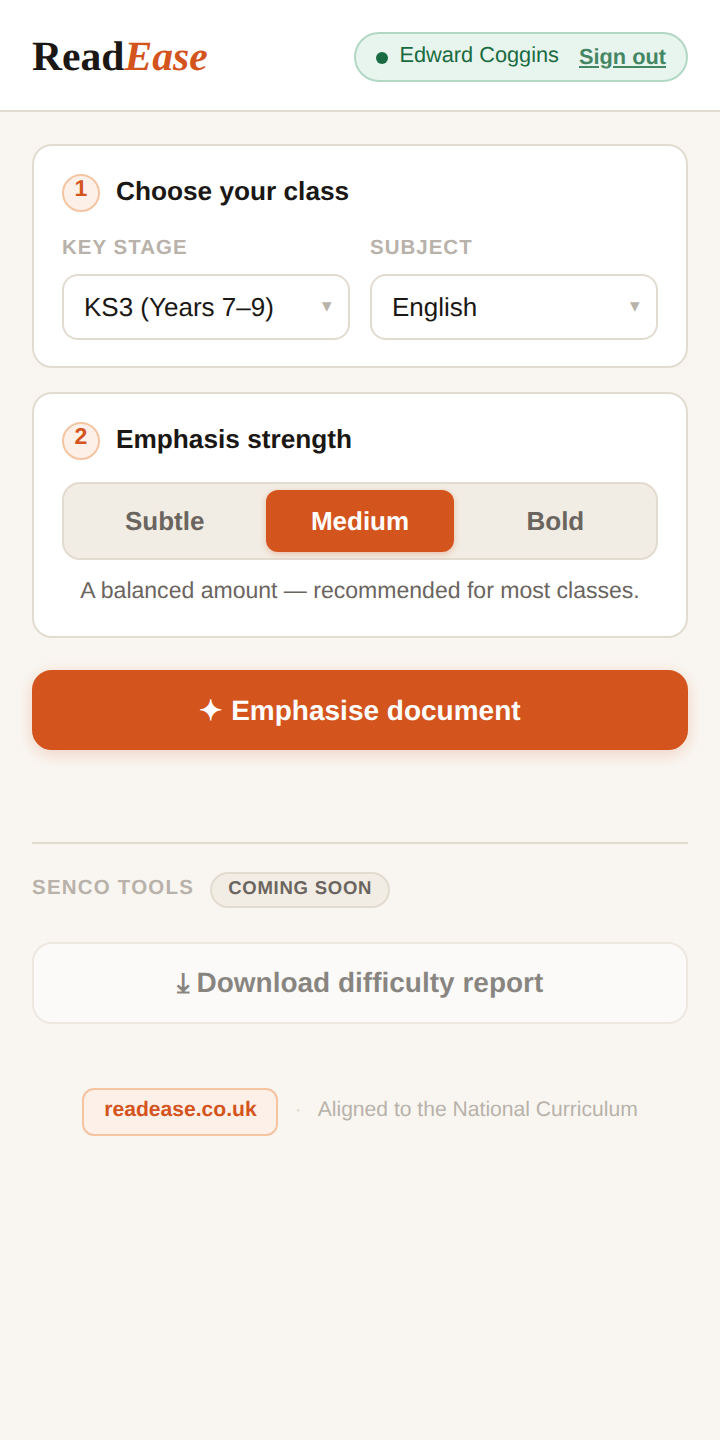
The ReadEase panel open beside a worksheet in Microsoft Word
  • Lives in a side panel inside Microsoft Word
  • Same five tiers, tuned by subject and Key Stage
  • Licensed per member of staff — 30-day free trial for your school
  • Staff sign in with their school email — no new passwords to manage

Not all words are created equal

Every word lands in one of five importance tiers. Tap a tier below to see which words it holds.

Photosynthesis lets green plants convert sunlight, water and carbon dioxide into glucose and oxygen.

Subtle enough to read naturally — clear enough for the brain to notice.

Built for every kind of reader

Reading difficulties affect one in five students. ReadEase levels the playing field without singling anyone out.

🧠
Students with dyslexia
Visual emphasis reduces cognitive effort, helping dyslexic readers process content more efficiently.
Students with ADHD
Important words act as visual anchors, making it easier to follow dense paragraphs to the end.
📚
Struggling readers
Clear visual hierarchy helps extract meaning even when reading fluency is limited.
🌍
EAL learners
Students in a second language can identify which unfamiliar words are worth looking up.

Trained on your curriculum

Each subject has its own AI-trained database — science vocabulary is scored differently from history or maths.

Bring ReadEase to your school

The Word add-in is licensed per member of staff, so your whole SEND team — or your whole staff room — can format worksheets and reading material for the students who need it.

  • Per-staff licence, billed monthly or annually — cancel anytime
  • Add staff by email — nothing to install centrally, no passwords to manage
  • 30-day free trial for your school, no card needed to start
  • Built with SENCOs in mind, with dedicated support from a real person

Start a 30-day school trial

  1. Email us — a quick hello is enough. We'll arrange a 15-minute demo if you'd like one.
  2. Send your staff list — we add your teachers' emails to your school's licence.
  3. Everyone reads easier — staff sign in with their school email and go. That's it.
Book a demo →

Get new features first

The Word add-in is coming to Microsoft AppSource, with school dashboards and more on the way. Hear about it first.

Built on proven science

ReadEase is grounded in peer-reviewed research on visual attention and reading. Our formatting is calibrated to established findings about how the eye processes emphasised text.

👁️
Eye Movement Research
Eye movement research shows that typographic emphasis creates visual anchors that guide where readers fixate. Emphasised words receive longer fixation duration, which can improve information retention during reading.
Rayner, K. (1998). Eye movements in reading and information processing. Psychological Bulletin, 124(3), 372–422.
🔤
Font Type for Dyslexic Readers
Sans serif, monospaced and roman font styles significantly improve reading performance for dyslexic readers compared to serif, proportional and italic fonts. This finding comes from eye-tracking studies with 48 participants with dyslexia.
Rello, L. & Baeza-Yates, R. (2013). Good fonts for dyslexia. Proceedings of ASSETS 2013, ACM.
⚖️
Preattentive Processing
Subtle typographic differences can be processed preattentively — meaning the brain registers visual differences before conscious awareness. ReadEase uses minimal weight and size changes designed to operate below the threshold of conscious detection.
Laarni, J. (2002). Effects of font format and text complexity on reading efficiency. Proceedings of NordiCHI.
🧠
Cognitive Load Theory
Visual cues in text can reduce working memory demands during reading by making semantic structure more apparent. This allows readers to allocate cognitive resources to comprehension rather than scanning for meaning.
Pammer, K. (2014). Visual factors in reading. Current Directions in Psychological Science, 23(1), 42–48.
Why AI emphasis matters
ReadEase uses Claude AI to score words for semantic importance rather than applying emphasis arbitrarily. Research shows that visual emphasis only helps comprehension when it aligns with genuine meaning — random emphasis can actually impair understanding. Our AI ensures that emphasised words genuinely matter to the text.
Help us prove it

Take our 8-minute reading study

We're building real evidence for schools — reading speed, comprehension and memory, plain text vs ReadEase. Anonymous, and it genuinely helps.

Contribute to the study →